

To post to multiple social media platforms at once, write the post in a scheduling tool, tick the accounts it should go to, and publish or schedule it. The tool sends it to each platform for you. You can also do it by hand, or use the cross-posting some platforms build in, but both run out of road quickly. This guide covers all three ways, then compares eight tools by the platforms they cover.
A note on who is writing. WyreIt is our own product, so read our view of it with that in mind. Where another tool is the better choice, this page says so.
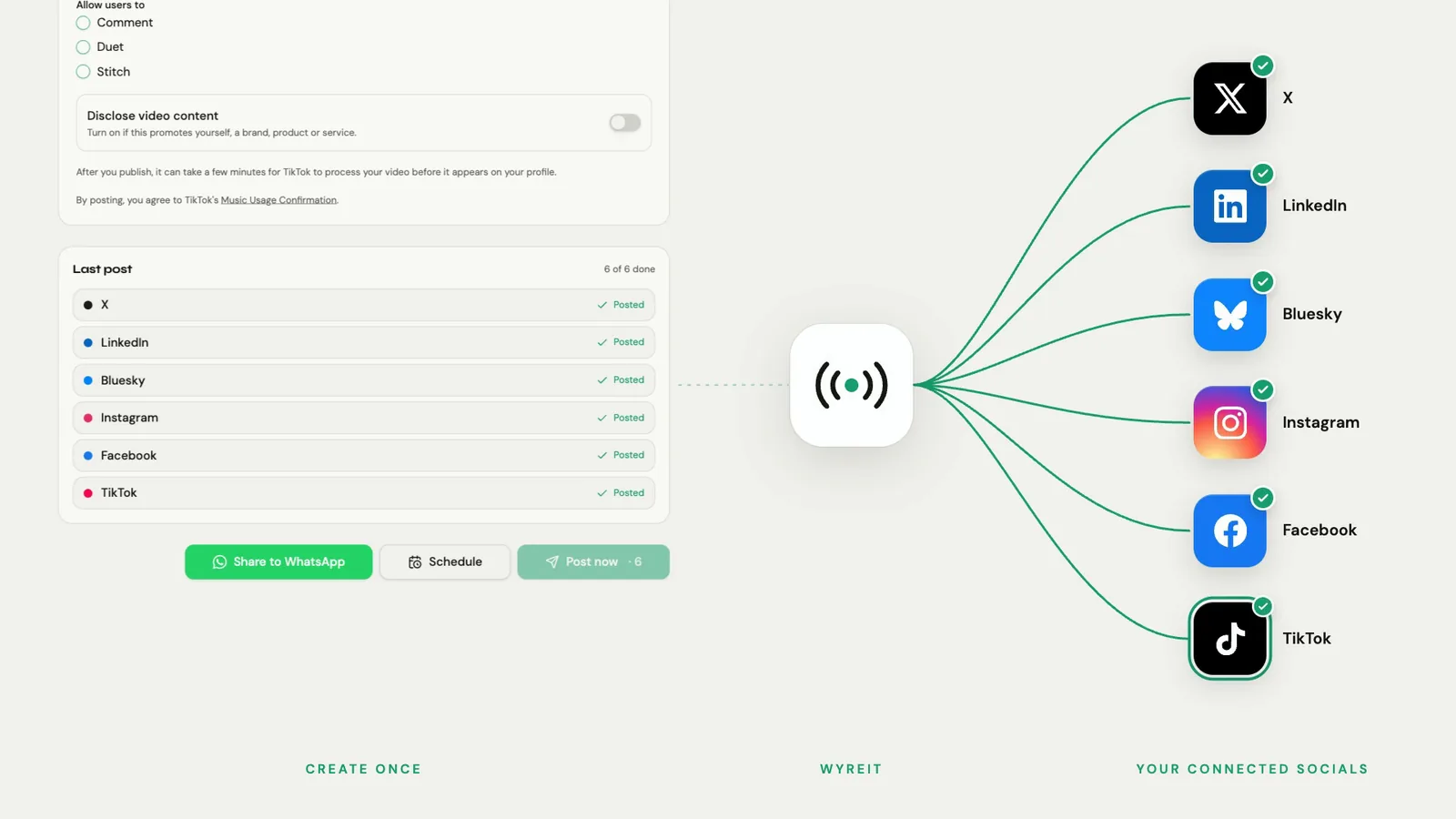
Three ways to do it
1. By hand, in each app
Open each app, upload, paste the caption, post. It costs nothing and it is fine for one or two platforms. It stops working when you post to more, because each app adds several minutes and the last ones tend not to get done.
2. The platforms' own cross-posting
Some platforms will pass a post to a sister platform. Instagram and Facebook, both owned by Meta, can share a post between them from inside the app. It is free and quick. The limit is that it only works within one company's platforms: nothing built into Instagram will also post to TikTok, LinkedIn or X.
3. A scheduling tool
A scheduling tool connects to each of your accounts with your permission. You write once, choose where it goes and when, and the tool publishes to each platform. This is the only one of the three that covers platforms owned by different companies, and the only one that lets you line up a week in a sitting.
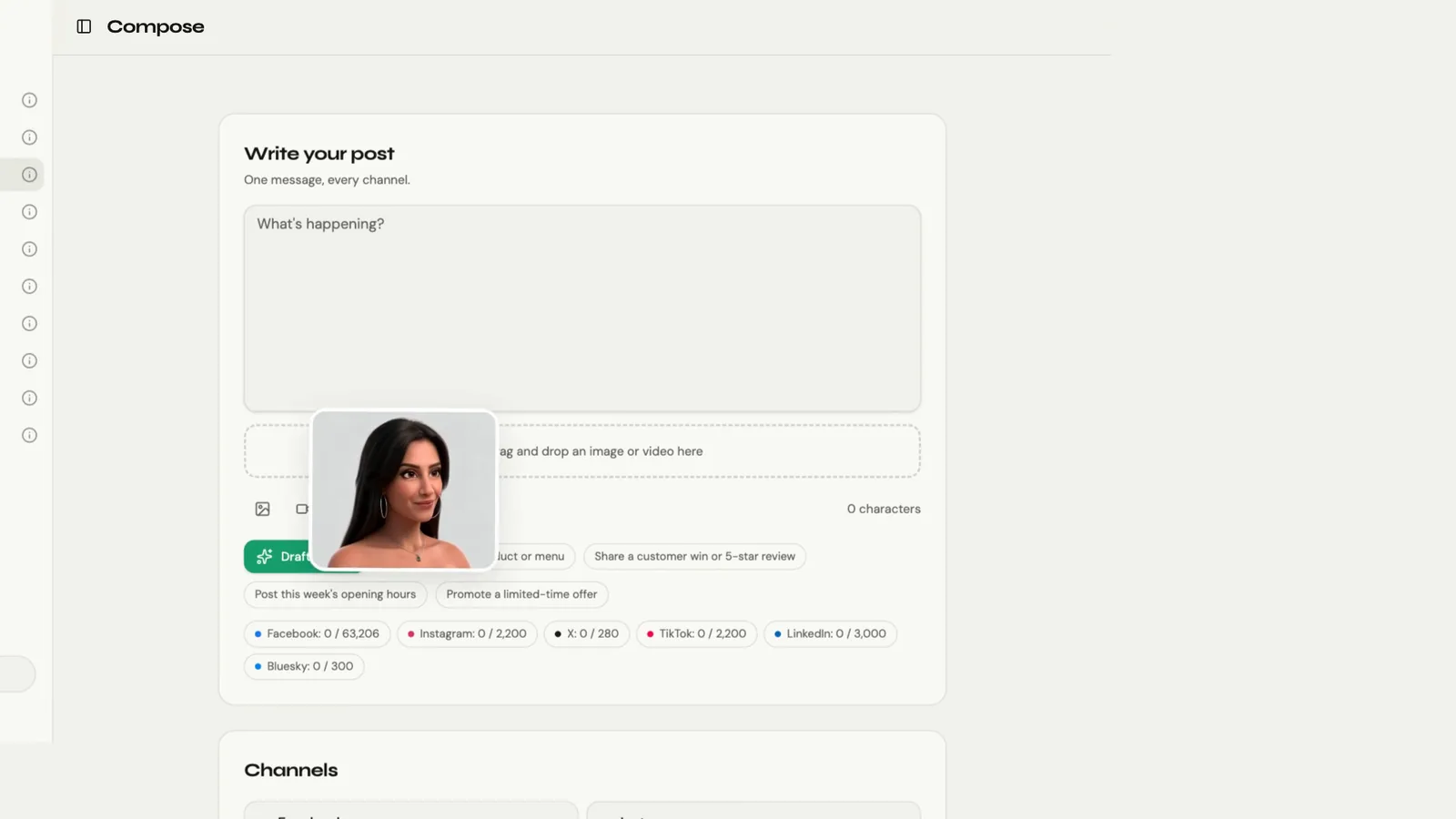
Step by step with a scheduling tool
The steps are much the same in any tool. Here they are in WyreIt.
- Connect your accounts. Sign in to each platform once from the tool. You approve access on the platform's own screen, and the tool never sees your password.
- Write the post once. Add the photo or video and the caption.
- Tick the accounts it should go to. One post can go to several platforms, and to more than one profile on the same platform.
- Adjust where it matters. A caption that suits Instagram may be too long for X. Check the length and the hashtags for each.
- Publish now or pick a time. Scheduled posts sit on a calendar until they go out.
- Check what happened. A post to five accounts has five outcomes. In WyreIt each one is shown separately, so a failure on one platform is not hidden behind four successes.
What to change for each platform
- Format. Short vertical video suits TikTok, Instagram and YouTube. In WyreIt, video is uploaded as mp4 up to 200MB, and Instagram video publishes as a Reel.
- Length. Text platforms such as X and Bluesky have short limits. Lead with the point.
- Links. Some platforms make links in captions clickable and some do not. Do not rely on a link that will not work.
- Tone. LinkedIn readers and TikTok viewers are often the same people in a different mood. A line or two of difference is enough.
For the two-platform version of this, with the format details, see how to post to TikTok and Instagram at the same time.
Eight tools compared by the platforms they cover
The first thing to check is whether a tool publishes to every platform you use. These lists are as published by each company in October 2026.
| Tool | Platforms listed | Entry paid price | Free plan or trial |
|---|---|---|---|
| WyreIt (our product) | Facebook, Instagram, X, TikTok, LinkedIn, YouTube, Bluesky | £19 a month (Standard), £49 (Pro), £79 (Creator) | No free plan. 14-day trial, no card |
| Buffer | Instagram, Facebook, TikTok, LinkedIn, X, YouTube, Threads, Pinterest, Google Business Profile, Bluesky, Mastodon | From $5 a month per channel on yearly billing ($60 a year per channel) | Free plan: up to 3 channels, 10 scheduled posts per channel |
| Hootsuite | See Hootsuite's page for its current list | $99 per user a month, billed annually (Standard) | No free plan. 14-day trial |
| Later | Instagram, Facebook, Threads, Pinterest, TikTok, LinkedIn, YouTube, Snapchat | $18.75 a month, billed yearly (Starter) | No free plan. 14-day trial |
| Metricool | Facebook, Instagram, Threads, Pinterest, TikTok, YouTube, Twitch, Bluesky, Google Business Profile; LinkedIn on paid plans; X as a paid add-on | Starter from $20 a month on annual billing ($25 monthly) | Free plan: 1 brand, 20 scheduled posts a month, no LinkedIn or X |
| Publer | Facebook, Instagram, TikTok, X (paid plans), Threads, LinkedIn, Pinterest, Mastodon, Google Business, YouTube, Telegram, Bluesky, WordPress | Paid price depends on how many accounts you add; see Publer's page | Free plan: 3 social accounts (not X), 10 scheduled posts per account |
| SocialBee | Facebook, Instagram, Threads, LinkedIn, X, Pinterest, TikTok, YouTube, Google Business Profiles, Bluesky | $29 a month, or $24 on annual billing (Bootstrap) | No free plan. 14-day trial, no card |
| Sendible | Instagram, Facebook, TikTok, X, LinkedIn, Google Business, YouTube, WordPress, Threads, Bluesky | Published in USD, GBP and EUR; see Sendible's page for the current figure | No free plan. 14-day trial |
Competitor prices and plan details are as published by each company on its own pricing page, October 2026: Buffer, Hootsuite, Later, Metricool, Publer, SocialBee, Sendible. Dollar prices are shown as each company lists them and may exclude VAT. Prices change, so check the page before you buy. WyreIt is our own product, and its prices are on our pricing page.
Which one for which situation
- The widest list of networks: Buffer and Publer both list more platforms than WyreIt, including Threads, Pinterest and Mastodon. If you post there, choose one of them.
- A free plan: Buffer (up to 3 channels), Publer (3 social accounts, not X) or Metricool (1 brand, without LinkedIn or X).
- X without an add-on: check carefully. Metricool charges $10 a month per connected X account, and Publer's free plan excludes X. WyreIt's plans include X, with a monthly allowance for X posts that carry a link; see pricing.
- One set price in pounds: WyreIt, at £19 a month for any 3 platforms or £49 for all 7.
- A team: Hootsuite, at $99 per user a month billed annually, with 10 social accounts on its Standard plan.
WyreIt in brief
WyreIt has four plans. Standard is £19 a month for any 3 platforms, with 3 extra profiles, the inbox, analytics, and AI caption and reply drafting. Pro is £49 a month for all 7 platforms (Facebook, Instagram, X, TikTok, LinkedIn, YouTube and Bluesky), with 4 extra profiles, WyreIt AI, Autopilot and 1,000 AI credits a month. Creator is £79 a month with 3,000 AI credits and AI images. Agency is priced by conversation. The price is for the account, not per user or per channel. There is a 14-day free trial with no card needed. The trial does not include any AI.
The inbox gathers comments, mentions and messages from the platforms you have connected, and WyreIt Analytics shows what was published and what failed for each account. Plans are on pricing.
Frequently asked questions
Can I post to all social media platforms at once for free?
Partly. Free plans exist, with limits: as published in October 2026, Buffer's covers up to 3 channels and Publer's covers 3 social accounts (not X). No free plan in this comparison covers every platform without limits.
Is it bad to post the same thing on every platform?
Posting the same idea everywhere is sensible. Posting it without any adjustment often reads badly, because lengths, formats and audiences differ. Keep the idea and adjust the caption.
Can I post to Facebook and Instagram at the same time without a tool?
Yes. Meta lets you share a post between Instagram and Facebook from inside the app. You need a tool once you add platforms outside Meta, such as TikTok, LinkedIn, YouTube or X.
How many platforms can WyreIt post to at once?
Up to 7: Facebook, Instagram, X, TikTok, LinkedIn, YouTube and Bluesky. Standard covers any 3 of them and Pro covers all 7.
What happens if one platform fails?
The others still go out. WyreIt shows the outcome for each account separately, so you can see which one failed and post it again. There is more on this in what happens when one platform publishes and another fails.
If you are choosing a tool, the comparison of nine social media tools for small businesses has the full price table.
WyreIt is a social media management tool for small business owners and sole traders. Post to Facebook, Instagram, X, TikTok, and more from one dashboard — at a fraction of the price of Hootsuite.